It’s really hard to beat layer 2 hacking to really mess stuff up. While folks are up at layer 4-7 messin’ around with this socket or that scripting vuln, I am down here at layer 2 all fat, dumb and… fat.
Now most folks have pushed layer two security off to the side as a internal LAN based attack and look to features like Dynamic ARP Inspection, IP Source Guard, Root Guard, etc to render these attacks as useless as meat thermometer at a vegan dinner. But with the massive spread of MPLS, Ethernet is being pushed to levels it was never really designed to be at. Layer 2 attacks are now as cool as the Fonz leaning against a 57 Chevy.
For example, I run a peer based security research lab here in Wisconsin. Me and about five other security folks around the world run sensors and try to hack into each others networks for practice, out right humiliation and of course beer bounties. Sitting in Milwaukee Wisconsin working on a Newcastle and a slow burning Rocky Patal 1990 Vintage after the family went to bed, I started working on hacking a peer of mines network. Knowing we both had MPLS trunks at the PE, I guessed they may be passing PDU’s in what is know as full transparency mode. I started up a simple ARP spoof and sure enough I was the default gateway for my friends traffic in Ottawa. Man that is really something to run these LAN type of attacks on the wide side.
For these types of attacks, it is really hard to beat to the tool Yersinia.
http://www.yersinia.net/ if you are running the BackTrack ISO, Yersinia is already compiled and ready to go, so skip on down a few steps, if not, let’s just make this easy and say you are using Ubuntu. To install Yersinia, just open up a terminal and type:
apt-get install yersinia
Using Yersinia is a simple as ******* on a airplane and blaming it on someone else. Yersinia is wrote in C and is multithreaded so more then one person can use it and more then one attack can be launched. Yersinia runs in one of three modes which are invoked at the command line:
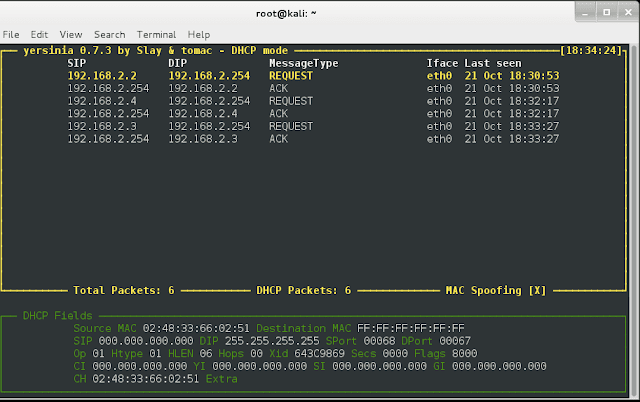
– yersinia -I is the Interactive mode. This is a ncurses graphical interface that will take you back to the editing autoexec files in the DOS days of old. This is the most popular mode for Yersinia. Once you are here, notice at the top of the screen, it tells you what protocol mode it is in. The default is STP. Press the “h” key for help. The most important keys to know at the start (besides h) are “g” to change protocol attack mode, “x” is the attack mode screen and “e” allows you to edit protocol fields. A mega cool plus is that the attack screen will tell you which attacks are DOS attacks so you don’t mess up and send the wrong one!
– yersinia -D is the Daemon mode. This mode is really cool. It allows me to start yersinia on a Linux machine and access it with any other via Telnet. For example after the daemon is started, I attached on port 12000: telnet 192.168.1.100 12000 It is designed to emulate IOS to some extent, so you will see a log in screen, U: root P:root but like IOS the fun stuff is at enable mode so now type:enable the password here is tomac. At this mode, all options must be set by hand, so…
Step One: is to config up a outbound interface: set interface eth0
Step Two: run your attack (STP in this example) with the command: run stp 1
This has to be done for each attack package, each time. I recommend liberal use of the ? command to figure out some of the config options and attack packages. It works at all levels like IOS. For example if you what to know the Spanning Tree Protocol attack packages type: run stp ?
Step Three: Monitor your success or failure with the show command. Attacks will run until you stop them and that is done with the command: cancel all to turn them all off or you can just cancel a single attack with the attack name.
– yersinia -G is the Final mode to run Yersinia in is the GTK graphical mode. While this is a nice looking point/click style of interface, it is a bit buggy and not used that much.
Yersinia really offers up a nice attack package for layer two pen testers. Protocols like CDP,VTP,HSRP,DTP,DHCP,STP,802.1Q and X are all fair game. Yersinia has to be ran at root level and to go into interactive mode (yersinia -I) you have to be at full screen on the terminal.
A couple of things I do not use Yersinia for:
– DHCP attacks. I think Goobler is better and offers more options
– VTP attacks on adding/removing VLANs do not seem to work
Tools like Yersinia never really go out of style. Misconfigs and fully transparent WAN PDU passing will always keep the dust knocked off of your layer 2 skills. Put good ole Yersinia to the test. It is easy to use and works VERY well!