Метка: traffic engineering

  • Ettercap 0.7.3 для Windows используем в дата-центре

    Ettercap 0.7.3 для Windows используем в дата-центре

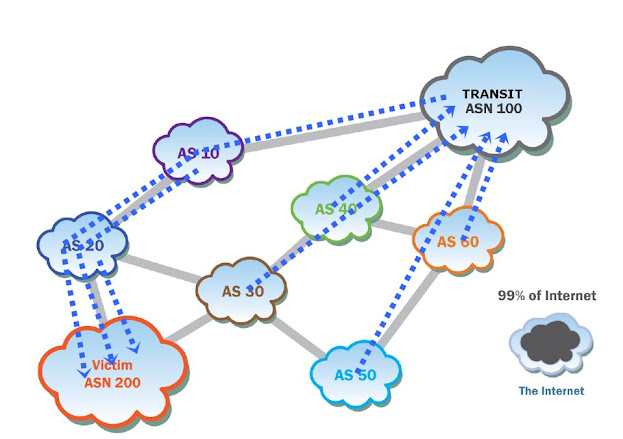
    Ettercap NG – сетевой sniffer /interceptor/ logger для коммутируемых сетей (switched LAN). Программа использует ARP poisoning и “man-in-the-middle” методы нападения, чтобы перехватывать подключения между двумя хостами в реальном времени. Вы можете перехватить трафик между двумя хостами в сети интернет, используя MAC-based sniffing mode. Позволяет перехватывать SSH1, HTTPS и другие защищенные протоколы. В последнее время часто используется для реализации сценариев bgp hijacking & traffic engineering при MiTM сценариях с майнинговыми пулами, воздействуя на механизмы глобальной маршрутизации трафика.

    Позволяет расшифровывать пароли для следующих протоколов — TELNET, FTP, POP, RLOGIN, SSH1, ICQ, SMB, MySQL, HTTP, NNTP, X11, NAPSTER, IRC, RIP, BGP, SOCKS 5, IMAP 4, VNC, LDAP, NFS, SNMP, HALF LIFE, QUAKE 3, MSN, YMSG или как это говорят на профильных площадках «Сетевой инженер шатает bgp».

    Перехват трафика Ettercap NG и как это работает?

    Ettercap NG умеет подменять MAC-адрес шлюза на свой собственный в ARP-таблице целевого устройства. В результате, весь трафик, предназначенный для шлюза, направляется на атакующий компьютер:

    ARP spoofing и захват bgp-сессии на точке обмена трафиком

    Более подробно это выглядит так:

    •  Ettercap NG отправляет поддельные ARP-пакеты, утверждая, что он является шлюзом.
    •  Целевое устройство обновляет свою ARP-таблицу и начинает отправлять весь трафик на машину с Ettercap NG.
    •  Ettercap NG перехватывает этот трафик и может его анализировать, модифицировать или перенаправлять.

    Как вариант Ettercap NG может устанавливать себя в качестве промежуточного устройства между клиентом и сервером. Весь трафик, проходящий через это соединение, проходит через Ettercap NG.

    • Ettercap NG перехватывает соединение между клиентом и сервером.
    • Модифицирует пакеты таким образом, чтобы клиент и сервер думали, что общаются напрямую.
    • Ettercap NG может дешифровать и шифровать трафик, а также изменять его содержимое.

    Как работать с Ettercap NG на точке обмена трафиком

    Если запускать Ettercap NG в домашней сети — толку от этого будет мало, можно увидеть свой трафик и больше ничего. Так как же посмотреть вширь и увидеть нечто большее? На днях довелось мне поработать на одной из точек обмена трафиком, через которую крупные и малые провайдеры интернета и магистральные операторы связи бесплатно обмениваются трафиком друг с другом. Дело всё в том, что в таких точках пиринга оборудование каждого участника подключается в общий коммутатор, хотя обмен маршрутами происходит посредством bgp через route-сервер, как правило под управлением Bird или FRR, ранее этот софт назывался Quagga или Zebra кому как удобнее. Но включены то они все в один управляемый свич, а значит тут возможны варианты:

    — <a> или ARP poisoning based sniffing, применяется для прослушивания трафика в коммутируемых локальных сетях второго уровня, а также для применения bgp spoofing сценариев класса mitm. В данном случае я использовал сценарий arpoison, который модифицирует ARP-таблицы целевых маршрутизаторов, подключенных к точке обмена трафиком таким образом, что все кадры данных с выбранного source шли на мой ноут с Ettercap NG, а с этого ноута уже — на destination в пункт назначения на bgp-роутер участника точки обмена трафиком, как показано на рисунке. 

    Иными словами, с помощью этого метода прослушивания трафика я проанализировал трафик выбранных мной участников точки обмена Internet Exchange Point, в том числе выходящий за пределы главного коммутатора этого peering point. На основе этого метода, уже с версии 0.6.7 Ettercap NG реализован перехват (dissection) паролей протокола https. У меня получилось даже собрать пароли ssh версии 2, когда я подключил соответствующий фильтр ettercap -F etter.filter.ssh, который подменяет версию ssh-сервера с 1.99 (openssh-0.9.6, etc) на 1.51, поддерживающую только первую версию протокола ssh.

    Однако, для реализации сценария arpoison, ettercap’у необходимо зафлудить сеть целой пачкой сгенерированных ARP-пакетов, но на современных управляемых коммутаторах уже есть средства, отлавливающие этот сценарий. С первой попытки сделать ARP-poison на коммутаторе точки обмена трафиком у меня не получилось, но со второй попытки, когда я добавил ложный IP-адрес, всё прекрасно сработало.

    — <s>, IP based sniffing и <m>, MAC based sniffing — это варианты обычного пассивного прослушивания трафика локальной сети. Возможности такого перехвата пакетов очень ограничены, хотя меня впечатлило количество поддерживаемых протоколов при относительно небольшом размере программы.

    Напихав нужные адреса ASBR роутеров, подключенных к точке обмена трафиком в source, destination или в оба сразу (я выбрал 192.168.0.10 в качестве source), выбирав метод прослушивания сети (я выбрал <a>), и попал в соответствующее окно:

    использование Ettercap NG 0.7.4 на точке обмена трафиком Internet Exchange Point (IXP)

    И вот тут я и увидел все интересующие меня соединения, в том числе bgp-сессии, установленные между ASBP роутерами участников обмена трафиком и route-сервером площадки.

    Для того, чтобы собрать пакеты с обновлениями bgp, делать не нужно вообще ничего =)) Наведя курсор на нужное мне соединение все данные bgp-сессии появлялись в нужной части экрана, и я сразу получил всё, что мне нужно =))

    найден bgp update packet

    Нажав на другую кнопку мне сразу открылся новый диапазон возможностей, уверен, он и тебя впечатлит. Убийство соединений, хайджекинг, филтеринг, etc… Что ещё нужно для перехвата bgp-сессии и реализации MiTM сценария через route leaking? =)

    На видео более подробно поговорим о traffic engineering и утечках маршрутов (route leaking) и к чему вообще всё это….


    Вкусности Route Leaks & Traffic Engineering

    Возможности программы Ettercap ng огромны, но я почти уверен, что они тебя не удовлетворят на все 100%. Ну что же, для твоих трафик-нижениринговых целей предусмотрены варианты в виде:

    • Написания плагинов, — ну тут все просто и понятно: не влезая в кишки ettercap’a, юзаешь плагинный интерфейс этой проги и делаешь нужный тебе компонент, который ты сможешь подгружать в программу всякий раз, когда тебе это нужно.
    • Возможность bind’ить локальный порт, с которым ettercap проассоциирует нужное тебе соединение, например по 179 порту. Это очень ценное свойство программы: ты сможешь заранее реализовать нужные тебе механизмы, воспроизвести которые в реальном времени обычными средствами весьма затруднительно =)) Проще говоря, влезать в чужие IRC-приваты и материться можно и руками, но если ты захочешь впарить кому-нибудь бекдор, проспуфив http или ftp, или сообщить какому-нибудь биржевому игроку, что его акции упали в цене в четыре раза, или же подменить некий криптомост, где плавают жирные киты на время своим мостом с нужными тебе смартконтрактами, такое свойство программы может оказаться весьма и весьма кстати =))

    Хочется отметить, что вот так запросто подключиться в Ethernet или SFP порт коммутатора мне удалось только на точке обмена трафиком (Internet Exchange Point), однако, в реальной жизни на узле того или другого крупного телекоммуникационного оператора все соединения, как правило, упакованы в VPLS/EPIPE/EVPN каналы, и добраться до них новичку с первого раза будет не так то просто, но об этом мы поговорим уже в следующий раз.

    Ettercap NG 0.7.3 скачать

  • Unuthorized Traffic Engineering MPLS Provider Edge

    Unuthorized Traffic Engineering MPLS Provider Edge

    Another Loki‘s usage case shows how to inject MPLS-VPN routing information (as described in RFC4364) into a MPLS Provider Edge router.

    The peer again is a Cisco 3750ME with a MPLS-VPN virtual routing and forwarding table associated with the customer ‘RED’:

    Cisco 3750 MP-BGP's Routing Information before route injection

    Loki is then used to inject the MPLS-VPN routing information:

    Injecting MPLS-VPN Routing Information with Loki

    Before setting up the session I need to overwrite the default session parameters with my custom BGP capabilities. This is done by filling in the optional connection parameters. Next the AS number and the hold timer need to be set. At last, the target host is missing, which in this example is the host with the IP address 10.10.10.1. After clicking on “Connect” a session setup is performed.

    If Loki is able to establish the connection, a background keep alive thread is started, which sends an BGP keep alive packet every hold time 4 seconds. The next step is to assigns the BGP update message. This message defines, which routing information to publish to the connected host.

    In the example case I build up a RFC4364 Multi-Protocol-BGP update packet, which says I am announcing the network 192.168.113.111/32 with the route distinguisher 100:0, which should be forwarded to the next hop 10.10.10.10. In the end I send the prepared update message by clicking on “Update”.

    After publishing the routing information, the router’s virtual routing and forwarding table for the customer ‘RED’ looks like this:

    Cisco 3750's MP-BGP Routing Information after VRF route injection using Loki

    One can see the new route for the host 192.168.113.111 pointing to my attack host 10.10.10.10.

    Click here to download Loki

  • Malicious Traffic Engineering from within the Carrier or Cloud Service

    Malicious Traffic Engineering from within the Carrier or Cloud Service

    Relabeling Attack

    Loki can be used to relabel 802.1Q tagged packets on the fly. Once an attacker is in the traffic path all seen 802.1Q communications are listed in the dot1q module.

    To rewrite a label in transmission between two hosts, it simply needs to be selected to fill in most of the fields for the rewrite rule. Only the target label and an optional tcpdump filter to match specific data streams need to be added.

    Once the rule is added a background thread takes care of the relabeling.

    Relabeling attack with Loki on L3VPN MPLS

    Modifying Q-in-Q on MPLS Network

    The dot1q module in Loki can also be used to rewrite the inner 802.1Q label used in Q-in-Q scenarios in the same way as when rewriting the outer 802.1Q label.

    Modifying Q-in-Q traffic using Loki on MPLS Network

    Network behavior with Security Impact, resulting from unified Layer2 Network

    If several sites form a common Layer2 domain after connecting them (mainly in “full transparency” cases), some interesting settings – with potentially huge security impact – can emerge.

    For example, there might only be one Spanning Tree Root in the whole (then worldwide) L2 network (or one per VLAN). Combined with the fact that some sites may even implement redundant links to the carrier network the following scenario might follow:

    Example Scenario of a Carrier Network - MPLS Network sample

    Here the network traffic resulting from Bob’s access to the fileserver with actually be forwarded to New York and back to Amsterdam (as the link between the switches in Amsterdam is in blocking state), effectively passing the MPLS backbone (possibly unencrypted). Moreover Bob (or the site’s or the company’s security officer) might be completely unaware of this situation.

    Another example of (at the first glance) “unexpected” network behavior is shown in the following diagram:

    L3VPN on MPLS Network

    With a fully transparent Intra-Site Ethernet connection the switch in New York will propagate it’s VLAN table to the switches in Amsterdam effectively melting down the complete network over there.

    Full transparency with regard to VLANs might impose another risk, shown in the following diagram: “VLAN visibility across the cloud”:

    VLAN visibility across the cloud

    Members of VLAN 10 in Paris (“wlan”) might be able to communicate with members of VLAN 10 in Amsterdam (“servers”), without notice or awareness of the sysadmins in Amsterdam. This is another example of the effects a fully transparent connection may have.

    Traditional Layer2 Attacks from One Site to Another

    It should be explicitly noted that – in a such a “unified Layer2 network” – the impact of a system compromise in one site may lead to Layer2 attacks against other sites (e.g. attacks against DTP with subsequent sniffing of remote VLANs with yersinia). Previously such attacks mostly probably were not possible.

    Misconfigurations on the Carrier Side, leading to Security Breaches of/within Customer Network

    If, for instance, the carrier is expected to provide “partial transparency” but actually “full transparency” is implemented (due to operational deficiencies and/or human error), security problems (like those depicted above) may arise.

    Another example (which in fact happens) is the accidental connection of sites belonging to different customers or leakage of routing information due to typos in the VRF/VFI identifiers.

    Misconfigurations on the Customer Side, leading to Breaches

    In “full transparency” scenarios diligent configuration of the customer’s network devices might be necessary to avoid security problems as discussed above. Bad operational practice or human errors may easily lead to severe problems here.

    Product or Technology Change on Carrier Side may lead to different Level of Transparency

    If the customer is unaware of the exact behaviour of the carrier’s Ethernet service at one point and “just doesn’t notice any problems”, a technology change (be a change of device firmware to a newer version, be a change of an infrastructure protocol’s configuration) may lead to security exposure. A well known historical example was the (mostly unannounced) introduction of a proprietary OSPF enhancement called Link Local Signaling in Cisco’s IOS which effectively broke OSPF sessions with (customer) Nokia devices after (carrier) IOS upgrades some years ago.

    Inconsistent Transparency Level amongst “Carrier Ethernet” Product(s) from one Vendor

    Carriers offering a nation- or even worldwide Ethernet service may technologically implement the product in different ways, depending on the distance between sites (“Metro Ethernet” in case of regional offices, VPLS if far distance between sites). The different technologies may behave differently then as for the level of transparency.

  • Unauthorized Traffic Engineering LDP

    Unauthorized Traffic Engineering LDP

    The Label Distribution Protocol, initially specified in the RFC 3036, is a signaling protocol for distributing labels for a label switched path in an MPLS network. In 2007 RFC 5036 was released and replaces the old specification. LDP serves a set of procedures and messages by which Label Switched Routers (LSRs) establish Label Switched Paths through a network by mapping network routing information to data-link layer switched paths. The procedures consist of four kinds of functions: discovery functions, session management, advertisement and notification.

    Trust Model

    LDP uses TCP to establish sessions between two LSRs. UDP is used for basic operations like discovery mechanisms which are periodically sent over the network to a well-known discovery port for all routers of a specific subnet. As these are sent to the “all routers on this subnet” group multicast address, with regard to the discovery process all routers on the local link are regarded trustworthy.

    Security Controls Inherent to Technology

    To protect the authenticity and integrity of LDP messages, LDP supports the TCP MD5 signature options described in RFC 2385. It has to be activated at the LSRs and may protect the messages by validating the segment by calculating and comparing the MD5 digest. To use the MD5 option a preconfigured password on each LSR is necessary.

    Abusing LDP

    Loki contains a universal LDP module, written in python. It implements the most common used LDP packet and data types and can be used to participate in the LDP discovery process, as well as establish targeted LDP sessions for advanced signaling. If such a targeted session is established, the tool starts a background thread which sends keep-alive packages to hold the connection open and the signaled data valid. To create such signaling data e.g. EoMPLS virtual circuits signaling, the module provides build-in data types which can be merged to the appropriated signaling packet.

    An Example for signaling EoMPLS virtual circuits

    The peer is a Cisco 3750ME was configured, but not activated virtual circuit:

    Cisco 3750ME was configured, but not activated virtual circuit

    Loki is the used to establish an LDP session and to send the necessary signaling information:

    establishing the LDP session with Loki

    First Loki needs to take part in the LDP discovery process; this is done by activating the Hello-Thread via clicking on the “Hello” button. Next the remote host tries to connect the attacks host via TCP, so Loki needs to listen for that incoming connection; this is done by activating the Listen-Thread via clicking on the “Listen” button. Once the Connection is established, the remote Host will show up in the Host-List. The next step is to configure the LDP update message, which defines the signaling message to publish to the remote host. In this case I generate a LDP Label-Mapping-Message. In the end I send the prepared update message by selecting the designated host from the host list and clicking on the “Update” button.

    After sending the LDP Label-Mapping-message the configured virtual circuit is activated on the remote side:

    After sending the LDP Label-Mapping-message the configured virtual circuit is activated on the remote side

    So, I activated the virtual circuit and mapped it to a label defined in the update message. A tool like mplstun could be used to set up a valid endpoint on the attacker’s side.

    Click here to download Loki