Рубрика: Без рубрики

  • Practical mitm bgp attack against backbone router

    Practical mitm bgp attack against backbone router

    Attacking BGP

    Loki contains a universal BGP module, written in python. It implements the most common used BGP packet and data types and can be used to establish a connection to a BGP speaking peer. Once a connection is established, the tool starts a background thread which sends keep-alive packages to hold the connection established and the published routes valid. To publish BGP routing information the module provides built-in data types which can be merged to the appropriated update statement. Once an update statement is set up it can be send once or multiple times to the connected peer. It is possible to use kernel based MD5 authentication, as described in RFC2385. Another module makes it possible to brute force the used MD5 authentication key.

    An Example for Injecting IPv4 Routing Information

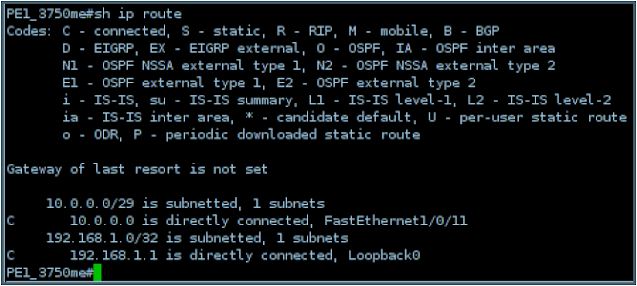
    The peer is a Cisco 3750ME with a (pre-attack) routing table looking like this:

    Cisco 3750 Routing Table

    Loki is then used to inject IPv4 routing information:

    Injecting IPv4 Routing Information using Insinuator

    The first step is to configuring the target IP address, the autonomous system number 2 and a hold timer of 8 seconds. Afterwards the session can be established by clicking on the “Connect” button. If Loki is able to establish the connection, a background keep alive thread is started, which sends an BGP keep alive packet every hold time / 4 seconds. The next step is to configure the BGP update message, which defines, the routing information to publish to the connected host. In the example case we build up a RFC1771 IPv4 routing BGP update packet which says we are announcing the network 192.168.233.0/24 and traffic for this network should be forwarded to the IP address 10.0.0.2 which is our target host. In the end we send the prepared update packet out by selecting the designated host from the connection list and clicking the “Update” button.

    After publishing the routing information, the router’s routing table looks like this:

    Cisco 3750 Routing Table after using Insinuator
    So we successfully injected a route to the network 192.168.233.0/24 which, in this case, directs all matching traffic to our target host. Click here to download Loki.
  • How Can an Attacker Get into the Traffic Path?

    How Can an Attacker Get into the Traffic Path?

    There are three main possibilities how an attacker or ”untrusted party“ can get into a position enabling the performance of the attacks described above.

    Network Device Compromise

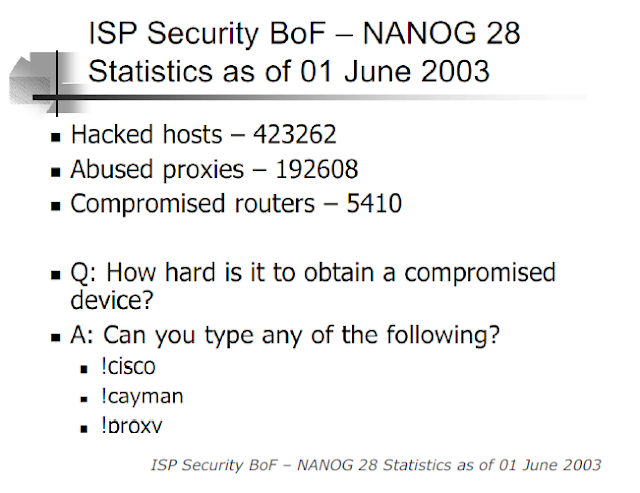
    Obviously this is the first (and probably most likely) possibility that comes to mind. The North American Network Operators’ Group periodically collects data on network security incidents amongst its members. The following slide shows that devices from carrier environments actually get compromised in the real world:

    ISP Security BoF – NANOG 28

    Device Injection

    The term “device injection” designates all scenarios where an untrusted party is enabled to place a device under its own control in the MPLS network of a carrier. While this may seem highly unlikely for an attacker (to “insert” an own device in a datacentre with strong physical access controls) it should be noted that some carriers allow very large customers to run their own PE routers (thereby potentially violating the assumption of a “trusted core which is solely managed by the carrier”). Similar scenarios might arise when PEs are located on customer premises which is why this practice is commonly advised against, see for example the following slide from a Cisco Live conference in 2010:

    MPLS PE router security

    Wire Access

    By this term all those scenarios are designated where an attacker gains access to the traffic path of certain packets without necessarily having compromised a device. This includes physical access to the wire as well as traffic redirection attacks in shared network segments.

  • BGP hijacking from within the Carrier or Cloud Service

    BGP hijacking from within the Carrier or Cloud Service

    Relabeling Attack

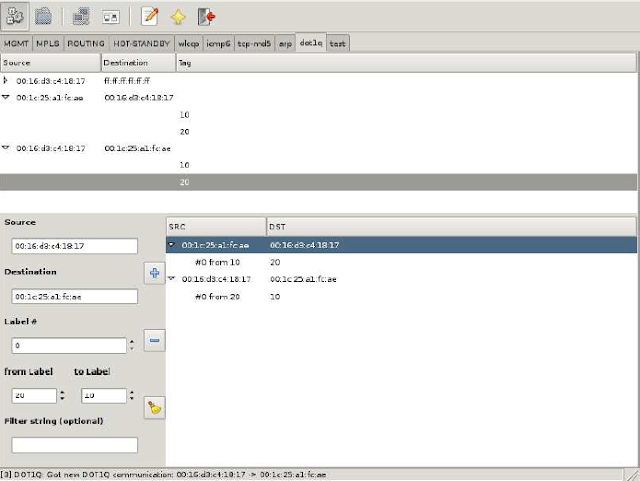
    Loki can be used to relabel 802.1Q tagged packets on the fly. Once an attacker is in the traffic path all seen 802.1Q communications are listed in the dot1q module. To rewrite a label in transmission between two hosts, it simply needs to be selected to fill in most of the fields for the rewrite rule. Only the target label and an optional tcpdump filter to match specific data streams need to be added. Once the rule is added a background thread takes care of the relabeling.

    Relabeling attack with Loki on L3VPN MPLS

    Modifying Q-in-Q on MPLS Network

    The dot1q module in Loki can also be used to rewrite the inner 802.1Q label used in Q-in-Q scenarios in the same way as when rewriting the outer 802.1Q label.

    Modifying Q-in-Q with Loki on MPLS Network

    Network Behaviour with Security Impact, Resulting from Unified Layer2 Network

    If several sites form a common Layer2 domain after connecting them (mainly in “full transparency” cases), some interesting settings – with potentially huge security impact – can emerge. For example there might only be one Spanning Tree Root in the whole (then world wide) L2 network (or one per VLAN). Combined with the fact that some sites may even implement redundant links to the carrier network the following scenario might follow:

    MPLS Network sample

    Here the network traffic resulting from Bob’s access to the fileserver with actually be forwarded to New York and back to Amsterdam (as the link between the switches in Amsterdam is in blocking state), effectively passing the MPLS backbone (possibly unencrypted). Moreover Bob (or the site’s or the company’s security officer) might be completely unaware of this situation.

    Another example of (at the first glance) “unexpected” network behaviour is shown in the following diagram:

    L3VPN on MPLS Network

    With a fully transparent Intra-Site Ethernet connection the switch in New York will propagate it’s VLAN table to the switches in Amsterdam effectively melting down the complete network over there.

    Full transparency with regard to VLANs might impose another risk, shown in the following diagram: “VLAN visibility across the cloud”:

    VLAN visibility across the cloud

    Members of VLAN 10 in Paris (“wlan”) might be able to communicate with members of VLAN 10 in Amsterdam (“servers”)8, without notice or awareness of the sysadmins in Amsterdam. This is another example of the effects a fully transparent connection may have.

    Traditional Layer2 Attacks from One Site to Another

    It should be explicitly noted that – in a such a “unified Layer2 network” – the impact of a system compromise in one site may lead to Layer2 attacks against other sites (e.g. attacks against DTP with subsequent sniffing of remote VLANs with yersinia). Previously such attacks mostly probably were not possible.

    Misconfigurations on the Carrier Side, leading to Security Breaches of/within Customer Network

    If, for instance, the carrier is expected to provide “partial transparency” but actually “full transparency” is implemented (due to operational deficiencies and/or human error), security problems (like those depicted above) may arise.

    Another example (which in fact happens) is the accidental connection of sites belonging to different customers or leakage of routing information due to typos in the VRF/VFI identifiers.

    Misconfigurations on the Customer Side, leading to Breaches

    In “full transparency” scenarios diligent configuration of the customer’s network devices might be necessary to avoid security problems as discussed above. Bad operational practice or human errors may easily lead to severe problems here.

    Product or Technology Change on Carrier Side may lead to different Level of Transparency

    If the customer is unaware of the exact behaviour of the carrier’s Ethernet service at one point and “just doesn’t notice any problems”, a technology change (be a change of device firmware to a newer version, be a change of an infrastructure protocol’s configuration) may lead to security exposure. A well known historical example was the (mostly unannounced) introduction of a proprietary OSPF enhancement called Link Local Signaling in Cisco’s IOS which effectively broke OSPF sessions with (customer) Nokia devices after (carrier) IOS upgrades some years ago.

    Inconsistent Transparency Level amongst “Carrier Ethernet” Product(s) from one Vendor

    Carriers offering a nation- or even world wide Ethernet service may technologically implement the product in different ways, depending on the distance between sites (“Metro Ethernet” in case of regional offices, VPLS if far distance between sites). The different technologies may behave differently then as for the level of transparency.
  • Attacking MPLS Provider Edge

    Attacking MPLS Provider Edge

    The another Loki‘s usage case shows how to inject MPLS-VPN routing information (as described in RFC4364) into a MPLS Provider Edge router.

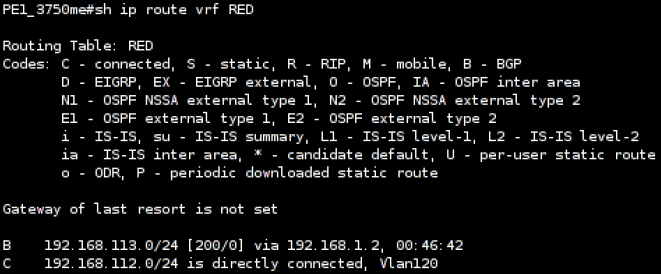
    The peer again is a Cisco 3750ME with a MPLS-VPN virtual routing and forwarding table associated with the customer ‘RED’:

    Cisco 3750 MP-BGP Routing Information

    Loki is then used to inject the MPLS-VPN routing information:

    Injecting MPLS-VPN Routing Information with Loki

    Before setting up the session we need to overwrite the default session parameters with our custom BGP capabilities. This is done by filling in the optional connection parameters.

    Next the AS number and the hold timer needs to be set. At last the target host is missing, which in this example is the host with the IP address 10.10.10.1. After clicking on “Connect” a session setup is performed.

    If loki is able to establish the connection, a background keep alive thread is started, which sends an BGP keep alive packet every hold time / 4 seconds.

    The next step is to assigns the BGP update message. 

    This message defines, which routing information to publish to the connected host. In the example case we build up a RFC4364 Multi-Protocol-BGP update packet, which says we are announcing the network 192.168.113.111/32 with the route distinguisher 100:0, which should be forwarded to the next hop 10.10.10.10. In the end we send the prepared update message by clicking on “Update”.

    After publishing the routing information, the routers virtual routing and forwarding table for the customer ‘RED’ looks like this:

    Cisco 3750 MP-BGP Routing Information after using Loki

    One can see the new route for the host 192.168.113.111 pointing to our attack host (10.10.10.10). Click here to dowload Loki.

  • Attacking MPLS VPNs

    Attacking MPLS VPNs

    Loki’s MPLS module is designed to relabel specified MPLS traffic with a given label. It can be used to manipulate the transport label and change the destination of the packet, or to redirect traffic into another MPLS-VPN. The module automatically detects all MPLS labeled traffic on the wire and let the user easily set up relabeling rules. It is possible to add a tcpdump filter to the relabeling rule, if the module should only redirect some special kind of traffic. Last but not least one can define which label in the label stack should be modified.

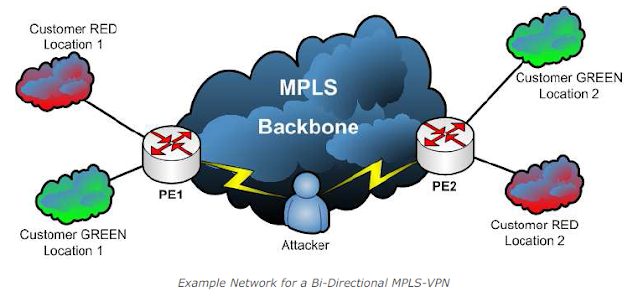
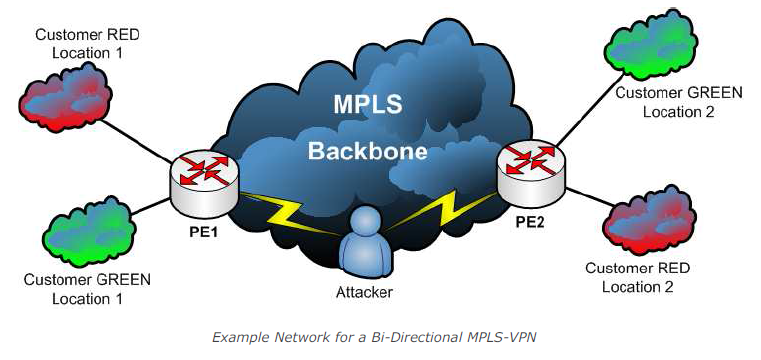
    It should be noted that this attack requires that the attacker has access to the traffic path of the respective packets. The setup for this example looks like this:

    Bi-Directional MPLS-VPN

    The attacker is in a Man-in-the-Middle situation inside the data path between Provider Edge 1 and Provider Edge 2 in the MPLS backbone.

    On PE1 the label association for the both MPLS-VPNs looks like this:

    Cisco 3750 Label Overview
    Cisco 3750 Label Overview

    Which means outgoing traffic for customer RED’s location 2 is tagged with the MPLS label 18. In the other direction, traffic tagged with MPLS label 20 is sent out to customers RED’s location 1. The same for customer GREEN, outgoing traffic for location 2 is tagged with label 19, incoming traffic with label 21 is sent out to location 1. Both customers use the same IP address space for the two locations, which is possible, as we got a logical separation in the routing of each customer.

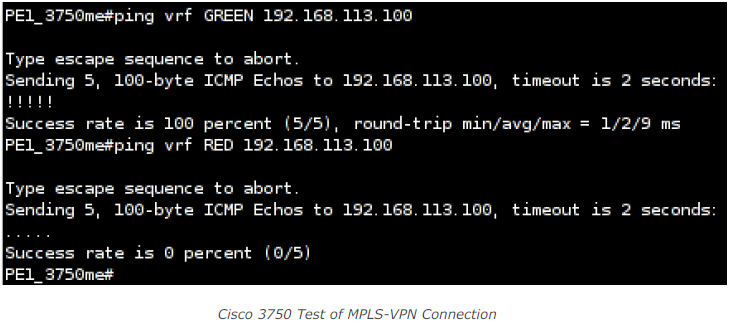
    Let’s further assume we got a client with the IP address 192.168.113.100 connected to customer GREEN’s location 2. So it’s possible to ping this client from PE1 in the context of customer GREEN. We need to specify the virtual routing and forwarding context of customer GREEN to use the customer’s specific routing table. If we run the same command in the context of customer RED, no response will be visible:

    Cisco 3750 test of MPLS-VPN Connection

    Next the attacker starts to redirect traffic from PE1 to PE2 in the backbone from customer RED’s MPLSVPN to customer GREEN’s MPLS-VPN and redirect traffic from PE2 to PE1 in the backbone from customer GREEN’s MPLS-VPN to customer RED’s MPLS-VPN by loki like this:

    Redirecting MPLS-VPN Traffic with Loki

    Once the redirection is in place it is possible to ping our assumed host from both, customer RED’s and customer GREEN’s context:

    Cisco 3750 Test of MPLS-VPN Connection after using Loki

    So this actually means that with right position in the traffic path and the right tool (e.g. Loki) an attacker can easily redirect a given site’s traffic of a given customer to a different destination (provided the IP addresses are the same which presumably is a valid assumption when it comes to addresses like 10.1.1.1 or 192.168.10.1).